 Defraggler 2.20.989
Screenshots of Defraggler



Defraggler Editor's Review
Disk defragmentation results in better performance of your computer. That's why Windows has a build-in tool with this purpose. However, most people avoid defragmenting their disks, even if we all know that it is recommended and can improve PC performance. The reasons is simple: the process takes too long to complete.
One of my favorite third party defragger and also the fastest out there is Defraggler - a tool developed by Piriform - the company behind both CCleaner and Recuva. Defraggler allows to defragment and optimize your local drives or a single file, several files or an entire folder.
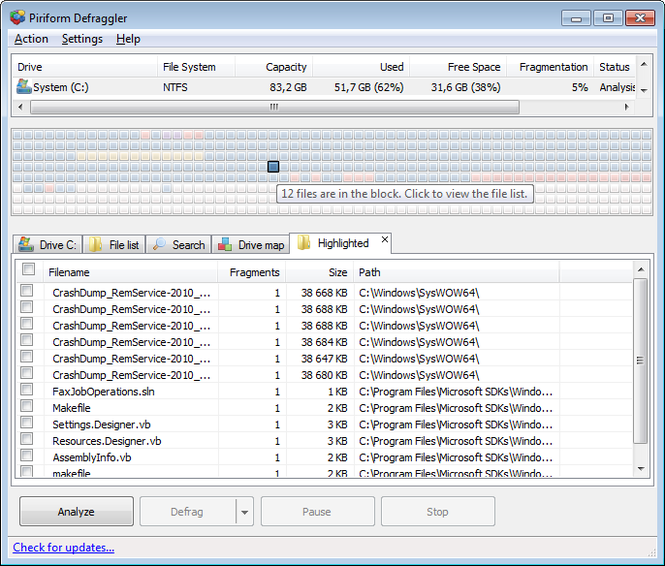
Defraggler is also very simply to use. If you would like to analyze your drive to determine how fragmented is prior to defragmentation, just use the Analyze button. Once the analysis will finish, it will show you the visual drive map along with the fragmented files. Sometimes, you simply don't need to defragment your hard drive, expecially if you're working with a relatively new PC, you've defragmented your drive recently, or you don't use your PC much.
Your hard drive needs to be defragmented? Simply click the Defrag button. If you want to save some time, there's is a feature called Quick Defrag, which completes the process 3-4 times faster. However, the compromise, though, is that it won't use the most intensive, optimal algorithm to reorganize your files. To use this feature, simply click the down-arrow next to Defrag button and select Quick Defrag.
Another great feature is the ability to move large files to the end of the hard drive. Your computer can accesses files faster if they're at the start of the drive. Defraggler can put the large files you probably don't access that often (videos, for example) at the end of the drive so that Windows can find the smaller files faster which are accessed more often.
Pluses: Ability to move large files to the end of the hard drive, very simply to use, free, fast defragment.
Drawbacks/flaws: None;
In conclusion: Simple enough for everyday users, and complex enough for those who demand the most options, Defraggler is what I highly recommend to defrag and optimize your hard disk.
Defraggler Publisher's Description
Use Defraggler to defrag your entire hard drive, or individual files - unique in the industry. This compact and portable Windows application supports NTFS and FAT32 file systems.
Other defragging programs are all-or-nothing: they don't have settings beyond defragmenting your entire hard drive at one go. With Defraggler, you can control over what...
Look for Similar Items by Category
Feedback
- If you need help or have a question, contact us
- Would you like to update this product info?
- Is there any feedback you would like to provide? Click here
Popular Downloads
-
 KaraFun Karaoke Player
2.6.2.0
KaraFun Karaoke Player
2.6.2.0
-
 Kundli
4.5
Kundli
4.5
-
 Macromedia Flash 8
8.0
Macromedia Flash 8
8.0
- FastSum 1.9
-
 FastSum Standard Edition
1.6
FastSum Standard Edition
1.6
-
 Cool Edit Pro
2.1.3097.0
Cool Edit Pro
2.1.3097.0
-
 Cheat Engine
6.8.1
Cheat Engine
6.8.1
-
 My Talking Tom
1.0
My Talking Tom
1.0
-
 Hill Climb Racing
1.0
Hill Climb Racing
1.0
-
 Tom VPN
2.2.8
Tom VPN
2.2.8
-
 C-Free
5.0
C-Free
5.0
-
 Windows XP Service Pack 3
Build...
Windows XP Service Pack 3
Build...
-
 Vidnoz AI
1.0.0
Vidnoz AI
1.0.0
-
 Netcut
2.1.4
Netcut
2.1.4
-
 Facebook Messenger
440.9.118.0
Facebook Messenger
440.9.118.0
-
 Vector on PC
1.0
Vector on PC
1.0
-
 FormatFactory
4.3
FormatFactory
4.3
-
 Auto-Tune Evo VST
6.0.9.2
Auto-Tune Evo VST
6.0.9.2
-
 Grand Theft Auto: Vice City
1.0
Grand Theft Auto: Vice City
1.0
-
 Minecraft
1.10.2
Minecraft
1.10.2